10 March, 2019

ADF : Scope Variables

Oracle ADF uses many variables and each variable has a scope.
There are five scopes in ADF (Application, Request, Session, View and PageFlow).
The below code snippest explains how to get value of each variable scope.

        AdfFacesContext adfCtx = AdfFacesContext.getCurrentInstance();
                
        //Page Flow Scope
        Map pageFlowMap  = adfCtx.getPageFlowScope();
        Object pageFLowVariable = pageFlowMap.get("VARIABLE_NAME");
        
        //View Scope
        Map viewMap  = adfCtx.getViewScope();
        Object viewVariable = viewMap.get("VARIABLE_NAME");
        
        //Session Scope
        HttpServletRequest request =
            (HttpServletRequest) FacesContext.getCurrentInstance().getExternalContext().getRequest();
        HttpSession session = request.getSession(false);
        Object sessionVariable = session.getAttribute("VARIABLE_NAME");
        
        //Request Scope
        Object requestVariable = request.getAttribute("VARIABLE_NAME");
        
        //Application Scope
        Map applicationMap = FacesContext.getCurrentInstance().getExternalContext().getApplicationMap();
        Object applicationVariable = applicationMap.get("VARIABLE_NAME");


Thanks

09 January, 2019

How to Pass Parameters to ActionListener in ADF

In some cases, it is required to pass a value to ActionListener of ADF Button.

The method that can be invoked by actionListeners has only one parameter of type ActionEvent. 
So I will explain how to pass parameter to that bean method however it contains only one paramater ActionEvent in method signature.

I added button to my page as below


The default signature of ActionLister is 


The workaround I used is adding an attribute tag from the JSF.Core inside the ADF Button So the code in the jsp page looks like this


Note "MyAttrName" is the name of paramater and "MyAttrValue" is the value of paramater.
You can bind  "MyAttrValue" to get any value from page definition.
Now I will write the followign code to get paramatervalue from bean

 
The variable "attrValue" holds the value of paramaters which is "MyAttrValue" in this example.

Thanks
Mahmoud Elsayed

28 November, 2017

OAF :Formatting DateTime Fields

Use the following code to format DateTime feilds in OAF

OAWebBean departureDateBean = webBean.findChildRecursive("DepartureDate");

OANLSServices nls = pageContext.getOANLSServices();
oracle.cabo.ui.validate.Formatter formatter =
    new OADateValidater(nls.getUserJavaDateFormat() + " HH:mm",
                        nls.getUserRRRRJavaDateFormat() + " HH:mm");
                       
departureDateBean.setAttributeValue(ON_SUBMIT_VALIDATER_ATTR, formatter);


Thanks

26 November, 2017

OAF : Bundled Exceptions

Bundled exceptions let you accumulate "peer" exceptions while proceeding with validation, and then display them as a set when you are done. These peer exceptions are grouped in a container exception called a bundled exception.

To creat a bundled exception, you first must create a list to which you add exceptions as you encounter them:

ArryList peerExceptions = new ArrayList();
peerExceptions.add(new OAException(....));

//Raise Exceptions
OAException.raiseBundledOAException(peerExceptions );

Thanks

21 November, 2017

OAF : Programmatically Add a Parameterized Pop-up

To programmatically add a parameterized pop-up to a component , add the following code in processRequest method

Step 1: Create an OAPopupBean 

 OAPopupBean popupBean1=(OAPopupBean)createWebBean(pageContext,POPUP_BEAN,null,"myPopup1");
popupBean1.setID("myPopup1");
popupBean1.setUINodeName("myPopup1");
popupBean1.setRegion("/oracle/apps/per/xyz/webui/PopupRN");
popupBean1.setHeight("130");
popupBean1.setWidth("320");
popupBean1.setTitle("Popup Title");
popupBean1.setParameters("personId={@PersonId}");
popupBean1.setType(PARAMETERIZED_POPUP);


Step 1: Add popup to item which you want to enable the pop-up, for example "EmpDtlBtn" button

OAButtonBean empDtlBtnBean = (OAButtonBean)webBean.findChildRecursive("EmpDtlBtn");
empDtlBtnBean.setPopupEnabled(true);
empDtlBtnBean.setPopupRenderEvent("onClick");
empDtlBtnBean.setPopupID("myPopup1");

webBean.addIndexedChild(popupBean1);


Thanks

24 September, 2017

Casting Data Type in Oracle Database

CAST function 
The CAST function converts a value from one data type to another data type.

Syntax
CAST ( [ Expression | NULL | ? ] AS Datatype)

Note : CAST conversions among SQL-92 data types.
The flowing are SQL-92 data types
  1. BOOLEAN
  2. SMALLINT
  3. INTEGER
  4. BIGINT
  5. DECIMAL
  6. REAL
  7. DOUBLE
  8. FLOAT
  9. CHAR
  10. VARCHAR
  11. LONG VARCHAR
  12. CHAR
  13. VARCHAR
  14. LONG VARCHAR
  15. CLOB
  16. BLOB
  17. DATE
  18. TIME
  19. TIMESTAMP
  20. XML
Examples
SELECT CAST (SYSDATE AS VARCHAR2 (12)) DATE_TO_VARCHAR FROM DUAL;
SELECT CAST ('12' AS INTEGER)  STRING_TO_NUMBERIC FROM DUAL;
SELECT CAST (NULL AS VARCHAR2 (2)) NULL_TO_STRING FROM DUAL;

As CAST only convert among SQL-92 data types, we can not use for example RAW data type.
But there are some packages casts to RAW like utl_raw.cast_to_raw

SELECT UTL_RAW.CAST_TO_RAW('Mahmoud') FROM DUAL;
output is : "4D61686D6F7564"

18 September, 2017

ADF : Send Parameter to actionListener method inside Bean

actionListener method method can be invoked by Adf Button , Link and Image.
actionListeners methods have only one parameter of type javax.faces.event.ActionEvent.

if requirement is to send some parameter to that bean method who’s signature is something like
public void myActionListener(ActionEvent actionEvent)

The solution to achieve this requirement is putting an attribute tag from the JSF.Core inside the commandButton (or whatever actionable component you are using). So the code in the jsp page looks like this:


Now i can get the value in the bean method by using below code

public void myActionListener(ActionEvent actionEvent) {
  // Add event code here...
  String paramValue = (String)actionEvent.getComponent().getAttributes().get("paramName");
  System.out.println("paramValue = " + paramValue);
}


06 December, 2016

OAF : Number Format

In OAF, There is not format expression in BC4J like ADF, So you do formatting using controller classes.

There are 2 ways to format numbers in OAF
  
1- Format Numbers
Write this code  in processRequest method

import oracle.cabo.ui.validate.Formatter;

        Formatter formatter =
            new OADecimalValidater("###,###,##0.00", "###,###,##0.00");
        OAWebBean numericBean = webBean.findChildRecursive("<>");
        if (numericBean != null)
            numericBean.setAttributeValue(ON_SUBMIT_VALIDATER_ATTR, formatter);


2- Format Number using currency format

Write this code  in processRequest method
        OAWebBean currencyBean = webBean.findChildRecursive("<>");
        if (currencyBean != null)
            currencyBean .setAttributeValue(CURRENCY_CODE, "USD");


Thanks

24 June, 2015

Display Calender in SQL and PLSQL

Today I will present how to display calendar specific month from oracle SQL or PLSQL like below image


So I will present the solution to do this

First I will create Object type to handle week days( Sunday, Monday, Tuesday, Wednesday, Thursday, Friday, Saturday)
 CREATE OR REPLACE TYPE WEEK_DAY AS OBJECT  
   (SUN NUMBER (2),  
   MON NUMBER (2),  
   TUE NUMBER (2),  
   WED NUMBER (2),  
   THU NUMBER (2),  
   FRI NUMBER (2),  
   SAT NUMBER (2));  

03 June, 2015

ADF ::: Creating View Criteria Programmatically

We can add view criteria programmatically at run-time to ViewObject. So that we not only depend on Design View Criteria.

The following is an example used to create View Criteria in Application Module Impl

ViewObject empVO= this.findViewObject("EmpVO");
ViewCriteria vc = empVO.createViewCriteria();
ViewCriteriaRow vcRow = vc.createViewCriteriaRow();

// ViewCriteriaRow attribute name is case-sensitive.
// ViewCriteriaRow attribute value requires operator and value.
// Note also single-quotes around string value.
ViewCriteriaItem enameItem= vcRow.ensureCriteriaItem("Ename");
enameItem.setOperator("=");
enameItem.getValues().get(0).setValue("Mahmoud Elsayed");
vc.add(vcRow);

empVO.applyViewCriteria(vc);


Thanks

02 June, 2015

ADF ::: Handle af:query search Button Programatically

The following code snippets is to execute search button in ADF Query search button programmatically without interact from User

    public void onQueryListener(QueryEvent queryEvent) {
        // Add event code here...
        try{
        FacesContext fcsCtx = FacesContext.getCurrentInstance();
        ELContext elCtx = fcsCtx.getELContext();
        ExpressionFactory expFactory = fcsCtx.getApplication().getExpressionFactory();
        MethodExpression mthdExp =
            expFactory.createMethodExpression(elCtx, "#{bindings.EmpVOCriteriaQuery.processQuery}", null,
                                              new Class[] { queryEvent.getClass() });
        mthdExp.invoke(elCtx, new Object[] { queryEvent });
        }
        catch(Exception e){
            e.printStackTrace();
        }
    }

Thanks

19 May, 2015

OAF : NewRowState of New Rows

By default, entity objects are created with the row state of STATUS_NEW, and BC4J adds them to its validation.  In this case, any event that triggers a validation or database post sequence includes these entity objects.
As per OAF Model Coding Standards, always circumvent this behavior by explicitly calling the setNewRowState(STATUS_INITIALIZED) method on its containing ViewRowImpl immediately after you insert the newly created row. This sets the state of any associated entity objects to STATUS_INITIALIZED.
When you do this, BC4J removes the corresponding entity objects from the transaction and validation listener lists, so they will not be validated or posted to the database. As soon as the user makes a change (an attribute "setter" is called), the entity object's state changes to STATUS_NEW, and BC4J returns it to the validation/post lists. You can also call setNewRowState(STATUS_NEW) on the ViewRowImpl to change the state manually at any time.


Let's trace some scenarios 
Scenario 1: Row has been modified in the UI before submit. Row State could be anything. 
  • The RowState becomes New.
  • ValidateEntity will get called before processFormRequest().
Scenario 2: Called row.setNewRowState(Row.STATUS_NEW) after inserting a new row. Row has not been modified from UI. 
 
ValidateEntity will not get called before processFormRequest() but will get called on commit and postChanges.
 
Scenario 3: Called row.setNewRowState(Row.STATUS_INITIALIZED) after inserting a new row. Row has not been modified from UI.
  • ValidateEntity will not get called before processFormRequest() or on commit or postChanges.
  • The Row will be ignored by the Framework and removed from the Cache.
  • Even the mandatory fields in the Entity Object are not checked.
Please make sure setting the row state (Row.setNewRowState) should be done after adding the row to VO as recommended in the OAF Standard.

Thanks

17 May, 2015

OAF: Parameters


Oracle Application Framework (OAF) can pass parameters between pages and there are three types of parameters
1- Request
The scope of request parameters is finalized after  HTTP request.

Examples of Request Parameters
  • URL Parameters
  • Input Bean values (Message Text Input, Choice , Check etc) and Hidden Field Values (form values) in case of post
  • Event triggering bean and the action in case of post.

Request values are accessed using OAPageContext.getParameter() method.

2- Transaction
Transaction has wider scope than Request which finalize with ending of database transaction.

You can create transaction parameter using OAPageContext.putTransactionValue() , ((OADBTransactionImpl)getTransaction()).putValue() .

Get transaction parameter values using OAPageContext.getTransactionValue() , ((OADBTransactionImpl)getTransaction()).getValue()

3- Session
Session has wider scope than Transaction which his life time is until user log out from application.

You can create Session parameter using OAPageContext.putSessionValue() ,  OAPageContext.putSessionValueDirect() .
 
Get transaction Session values using OAPageContext.getSessionValue();


URL Parameters Encryption and Encoding
We can encrypt parameters when  passing in URL in the following formats
1- {@Attr}  encodes. Changes Mahmoud Elsayed to Mahmoud %Elsayed
2- {!Attr} encrypts parameter value, Get parameter value in Controller using OAPageContext.getDecryptedParameter()
3- {$Attr} plain token substitution (no encoding or encryption), Get parameter value in Controller using OAPageContext.getParameter()
 
Global parameters in URL
1- {@@RETURN_TO_MENU}  Used for E-Business Suite Personal Home Page. Same as OAWebBeanConstants.RETURN_TO_MENU_URL.

2- {@@RETURN_TO_PORTAL} - Return the user to a launching Portal page. Same as OAWebBeanConstants.RETURN_TO_PORTAL_URL.


Thanks

14 May, 2015

Display Detail Rows as One Column in Master

Sometimes, it is required to display detail rows as a single column in master row.
For example in scott schema you have two tables ( DEPT, EMP) which relation is 1-M .

If required to display Employees names separated by comma  as one column per every DEPTNO, ÷In order to the final output like the following.


The easiest way to get output of previous diagram is the following SQL query.

    SELECT d.deptNo,
           MAX (SUBSTR (SYS_CONNECT_BY_PATH (d.eName, ','), 2)) employees
      FROM (SELECT deptNo,
                   eName,
                   ROW_NUMBER ()
                      OVER (PARTITION BY deptNo ORDER BY deptNo, eName)
                      rnum
              FROM scott.emp) d
START WITH d.rnum = 1
CONNECT BY d.rnum = PRIOR d.rnum + 1 AND PRIOR d.deptNo = d.deptNo
  GROUP BY d.deptNo


Thanks

20 April, 2015

ADF & OAF ::: Missing IN or OUT parameter

If the bind variable required property wrongly defined into View Object, then it will cause following exception
"java.sql.SQLException: Missing IN or OUT parameter at index:: 1 "

To avoid this exception, you have to keep in mind when you are creating bind variable.
 1- If you are directly passing the bind variable in view object main query then in this case bind variable require property should be selected.

2- If you are using bind variable in view criteria only  then in this case the bind variable require property should not be selected.

Thanks

21 October, 2013

OAF : Trace OAF Pages


To enable diagnostic for specific user set Profile Option FND: Diagnostics to YES
See this article about profile option

Now login at application, you will find in global buttons "Diagnostics" link, click it.
Enter the follwing
Diagnostic: Show Log on Screen
Log Level : Statement (1)
Module : %

Now Click go button

Now when opening any page at application you will find trace at button of page.


Thanks

16 October, 2013

OAF : Programatically Add Region to OA Page

Sometimes in OAF, you want to add a region to OA Page.

For example i had a requirement to add employee summary region to another page.
Employee Summary Page exists at MDS at this path "/oracle/apps/per/selfservice/common/webui/AsgSummaryRN".

Application module that is used with this region is "oracle.apps.per.selfservice.common.server.SummaryAM"

I wrote the following code to add this page to another page at controller of OA page

ipublic void processRequest(OAPageContext pageContext, OAWebBean webBean) {
 super.processRequest(pageContext, webBean);
 
 OATableLayoutBean empSummaryBeean = 
  (OATableLayoutBean)this.createWebBean(pageContext, 
             "/oracle/apps/per/selfservice/common/webui/AsgSummaryRN", 
             "AsgSummaryRN", true);
 empSummaryBeean.setApplicationModuleDefinitionName("oracle.apps.per.selfservice.common.server.SummaryAM");
 empSummaryBeean.setStandalone(true);
 webBean.addIndexedChild(0, empSummaryBeean);
}


Thanks

14 October, 2013

OAF : Configure Jdeveloper for OAF


Developers use specific version of Jdeveloper to extend or customize OAF pages.
Each Oracle OAF framework has specific version of Jdeveloper used with it.

Before configuring jdeveloper you must know current OAF version used by Oracle EBS.
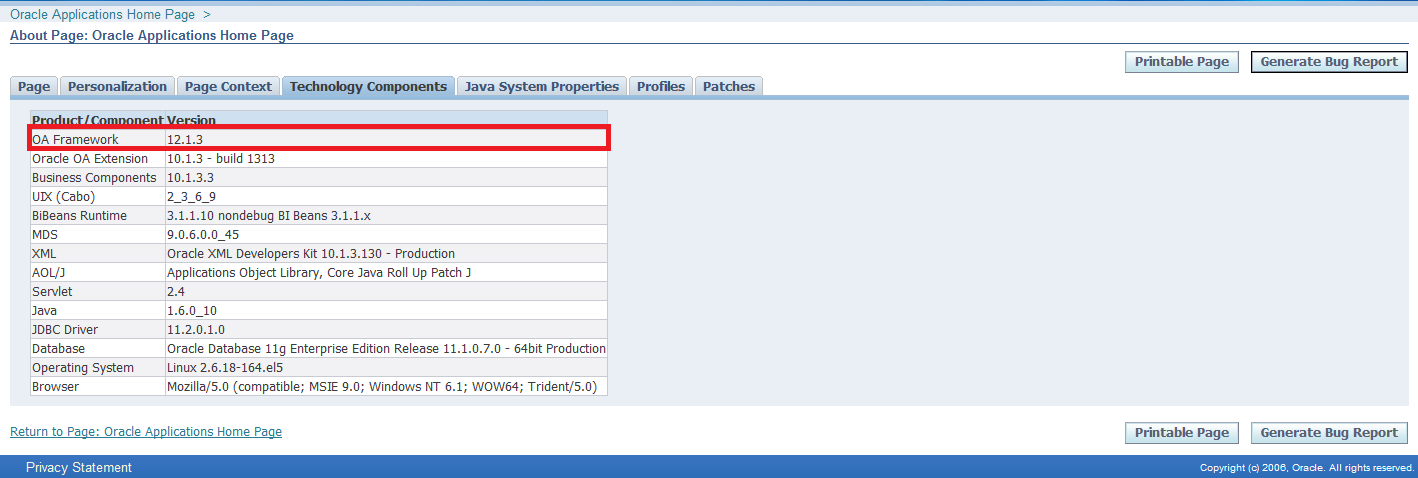
To get OAF version used by your instance, login at application and click "About this page" link on the left button of OA page and select "Technology Components" tab.

After knowing your OAF framework version , login at Oracle Support and open Note ID: ID 787209.1 - How to find the correct version of JDeveloper to use with eBusiness Suite 11i or Release 12.


Download correct Jdeveloper patch and extract anywhere at your machine.

Follow the following steps to configure Jdeveloper

1- Specify Path of jdeveloper
Right click on My Computer, select Properties, click System Properties, Select Advanced tab , Click Environment Variables as given below screen shot
Variable name : JDEV_USER_HOME

Variable value : <>


2- Download DBC file
Download dbc file for this path $FND_TOP/secure at application server to local machine folder <>\dbc_files\secure

3- Create Database Connection
Open jdeveloper.exe from jdevbin folder
Select Connection Navigator, right click on Database and select New Database Connection

 In step1write Connection Name and choose Oracle(JDBC) at Connection Type


In step2 fill user name and password and deselect Deploy Password


In step3 fill connection details


In step4 you can click test connection


4- Project Properties
After creating workspace and project, click right click on project and select Project Properties


Select Business Compoenent in left pane, select from drop list your connection


Select  Oracle Applications > Runtime Connection  
Fille the following
DBC File Name : path of dbc file that was downloaded at previous step
User Name : application user name
Password : application user name password

Application Short Name : Enter short name of the responsibility that when running page in Jdeveloper local will run under this responsibility
Responsibility Key : Key of responsibility.


Thanks

11 October, 2013

OAF : Disable Global Buttons in Page

I write snippet code to disable global buttons in OAF page.
You can add the following code to Controller class of the page that you want to disable global buttons inside it.

    public void processRequest(OAPageContext pageContext, OAWebBean webBean) {
        super.processRequest(pageContext, webBean);

        OAPageLayoutBean pageLayoutBean = 
            (OAPageLayoutBean)pageContext.getPageLayoutBean();
        pageLayoutBean.prepareForRendering(pageContext);

        OAGlobalButtonBarBean globalButtonsBean = 
            (OAGlobalButtonBarBean)pageLayoutBean.getGlobalButtons();
        globalButtonsBean.setRendered(false);
    }

Thanks

09 October, 2013

Route HTTP to HTTPS in HttpClient

I published before an article about JAVA : Get html Page Source through Website URL that HttpClient was used to send Get method and get Response.

Sometime developer want to route Http to Https when invoking Urls.
So You can use WebClientWrapper.wrapClient to do this issue.

import java.security.cert.CertificateException;
import java.security.cert.X509Certificate;

import javax.net.ssl.SSLContext;
import javax.net.ssl.TrustManager;
import javax.net.ssl.X509TrustManager;

import org.apache.http.client.HttpClient;
import org.apache.http.conn.ClientConnectionManager;
import org.apache.http.conn.scheme.Scheme;
import org.apache.http.conn.scheme.SchemeRegistry;
import org.apache.http.conn.ssl.SSLSocketFactory;
import org.apache.http.impl.client.DefaultHttpClient;

public class WebClientWrapper {
    public static HttpClient wrapClient(HttpClient base) {
        try {
            SSLContext ctx = SSLContext.getInstance("TLS");
            X509TrustManager tm = new X509TrustManager() {

                public void checkClientTrusted(X509Certificate[] xcs,
                                               String string) throws CertificateException {
                }

                public void checkServerTrusted(X509Certificate[] xcs,
                                               String string) throws CertificateException {
                }

                public X509Certificate[] getAcceptedIssuers() {
                    return null;
                }
            };
            ctx.init(null, new TrustManager[] { tm }, null);
            SSLSocketFactory ssf = new SSLSocketFactory(ctx);
            ssf.setHostnameVerifier(SSLSocketFactory.ALLOW_ALL_HOSTNAME_VERIFIER);
            ClientConnectionManager ccm = base.getConnectionManager();
            SchemeRegistry sr = ccm.getSchemeRegistry();
            sr.register(new Scheme("https", ssf, 443));
            return new DefaultHttpClient(ccm, base.getParams());
        } catch (Exception ex) {
            ex.printStackTrace();
            return null;
        }
    }
}


Thanks

ADF : Scope Variables

Oracle ADF uses many variables and each variable has a scope. There are five scopes in ADF (Application, Request, Session, View and PageFl...