Showing posts with label Jdeveloper. Show all posts

10 March, 2019

ADF : Scope Variables

Oracle ADF uses many variables and each variable has a scope.
There are five scopes in ADF (Application, Request, Session, View and PageFlow).
The below code snippest explains how to get value of each variable scope.

        AdfFacesContext adfCtx = AdfFacesContext.getCurrentInstance();
                
        //Page Flow Scope
        Map pageFlowMap  = adfCtx.getPageFlowScope();
        Object pageFLowVariable = pageFlowMap.get("VARIABLE_NAME");
        
        //View Scope
        Map viewMap  = adfCtx.getViewScope();
        Object viewVariable = viewMap.get("VARIABLE_NAME");
        
        //Session Scope
        HttpServletRequest request =
            (HttpServletRequest) FacesContext.getCurrentInstance().getExternalContext().getRequest();
        HttpSession session = request.getSession(false);
        Object sessionVariable = session.getAttribute("VARIABLE_NAME");
        
        //Request Scope
        Object requestVariable = request.getAttribute("VARIABLE_NAME");
        
        //Application Scope
        Map applicationMap = FacesContext.getCurrentInstance().getExternalContext().getApplicationMap();
        Object applicationVariable = applicationMap.get("VARIABLE_NAME");


Thanks
02 June, 2015

ADF ::: Handle af:query search Button Programatically

The following code snippets is to execute search button in ADF Query search button programmatically without interact from User

    public void onQueryListener(QueryEvent queryEvent) {
        // Add event code here...
        try{
        FacesContext fcsCtx = FacesContext.getCurrentInstance();
        ELContext elCtx = fcsCtx.getELContext();
        ExpressionFactory expFactory = fcsCtx.getApplication().getExpressionFactory();
        MethodExpression mthdExp =
            expFactory.createMethodExpression(elCtx, "#{bindings.EmpVOCriteriaQuery.processQuery}", null,
                                              new Class[] { queryEvent.getClass() });
        mthdExp.invoke(elCtx, new Object[] { queryEvent });
        }
        catch(Exception e){
            e.printStackTrace();
        }
    }

Thanks

14 October, 2013

OAF : Configure Jdeveloper for OAF


Developers use specific version of Jdeveloper to extend or customize OAF pages.
Each Oracle OAF framework has specific version of Jdeveloper used with it.

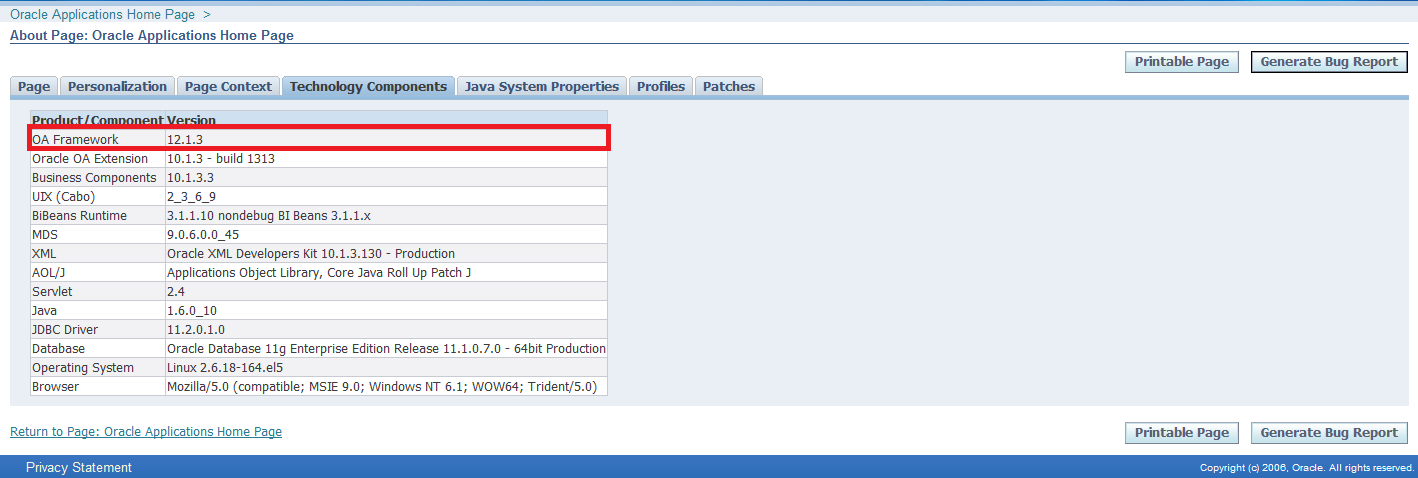
Before configuring jdeveloper you must know current OAF version used by Oracle EBS.
To get OAF version used by your instance, login at application and click "About this page" link on the left button of OA page and select "Technology Components" tab.

After knowing your OAF framework version , login at Oracle Support and open Note ID: ID 787209.1 - How to find the correct version of JDeveloper to use with eBusiness Suite 11i or Release 12.


Download correct Jdeveloper patch and extract anywhere at your machine.

Follow the following steps to configure Jdeveloper

1- Specify Path of jdeveloper
Right click on My Computer, select Properties, click System Properties, Select Advanced tab , Click Environment Variables as given below screen shot
Variable name : JDEV_USER_HOME

Variable value : <>


2- Download DBC file
Download dbc file for this path $FND_TOP/secure at application server to local machine folder <>\dbc_files\secure

3- Create Database Connection
Open jdeveloper.exe from jdevbin folder
Select Connection Navigator, right click on Database and select New Database Connection

 In step1write Connection Name and choose Oracle(JDBC) at Connection Type


In step2 fill user name and password and deselect Deploy Password


In step3 fill connection details


In step4 you can click test connection


4- Project Properties
After creating workspace and project, click right click on project and select Project Properties


Select Business Compoenent in left pane, select from drop list your connection


Select  Oracle Applications > Runtime Connection  
Fille the following
DBC File Name : path of dbc file that was downloaded at previous step
User Name : application user name
Password : application user name password

Application Short Name : Enter short name of the responsibility that when running page in Jdeveloper local will run under this responsibility
Responsibility Key : Key of responsibility.


Thanks

09 October, 2013

Route HTTP to HTTPS in HttpClient

I published before an article about JAVA : Get html Page Source through Website URL that HttpClient was used to send Get method and get Response.

Sometime developer want to route Http to Https when invoking Urls.
So You can use WebClientWrapper.wrapClient to do this issue.

import java.security.cert.CertificateException;
import java.security.cert.X509Certificate;

import javax.net.ssl.SSLContext;
import javax.net.ssl.TrustManager;
import javax.net.ssl.X509TrustManager;

import org.apache.http.client.HttpClient;
import org.apache.http.conn.ClientConnectionManager;
import org.apache.http.conn.scheme.Scheme;
import org.apache.http.conn.scheme.SchemeRegistry;
import org.apache.http.conn.ssl.SSLSocketFactory;
import org.apache.http.impl.client.DefaultHttpClient;

public class WebClientWrapper {
    public static HttpClient wrapClient(HttpClient base) {
        try {
            SSLContext ctx = SSLContext.getInstance("TLS");
            X509TrustManager tm = new X509TrustManager() {

                public void checkClientTrusted(X509Certificate[] xcs,
                                               String string) throws CertificateException {
                }

                public void checkServerTrusted(X509Certificate[] xcs,
                                               String string) throws CertificateException {
                }

                public X509Certificate[] getAcceptedIssuers() {
                    return null;
                }
            };
            ctx.init(null, new TrustManager[] { tm }, null);
            SSLSocketFactory ssf = new SSLSocketFactory(ctx);
            ssf.setHostnameVerifier(SSLSocketFactory.ALLOW_ALL_HOSTNAME_VERIFIER);
            ClientConnectionManager ccm = base.getConnectionManager();
            SchemeRegistry sr = ccm.getSchemeRegistry();
            sr.register(new Scheme("https", ssf, 443));
            return new DefaultHttpClient(ccm, base.getParams());
        } catch (Exception ex) {
            ex.printStackTrace();
            return null;
        }
    }
}


Thanks

04 October, 2013

JAVA : Get html Page Source through Website URL


To get source code of website page you can use HttpClient ,I will  send GET method and then get response.
The response has content of website URL.

I used Apache HttpClient package to implement this task.

In this Class I used  getStringFromInputStream method that was I was posted before in Convert InputStream to String.

here you can find Class do this task
Note I use static method WebClientDevWrapper.wrapClient, you can find its code in the article Route HTTP to HTTPS in HttpClient

import java.io.BufferedReader;
import java.io.IOException;
import java.io.InputStream;
import java.io.InputStreamReader;

import org.apache.http.HttpEntity;
import org.apache.http.HttpResponse;
import org.apache.http.client.methods.HttpGet;
import org.apache.http.client.HttpClient;
import org.apache.http.impl.client.DefaultHttpClient;

public class WebsiteSource {
    public static String getSource(String url) throws Exception {
        String retValue = "";
        HttpClient httpclient = new DefaultHttpClient();
        WebClientDevWrapper.wrapClient(httpclient);
        try {
            HttpGet httpget = new HttpGet(url);

            // Execute HTTP request
            HttpResponse response = httpclient.execute(httpget);

            //Get status : Response Ok will be HTTP/1.1 200 OK
            System.out.println(response.getStatusLine());

            // Get hold of the response entity
            HttpEntity entity = response.getEntity();
            if (entity != null) {
                InputStream instream = entity.getContent();
                try {
                    retValue =
                            WebsiteSource.getStringFromInputStream(instream);

                } catch (RuntimeException ex) {
                    httpget.abort();
                    throw ex;
                } finally {
                    // Closing the input stream will trigger connection release
                    try {
                        instream.close();
                    } catch (Exception e) {
                    }
                }
            }

        } finally {
            httpclient.getConnectionManager().shutdown();
        }
        return retValue;
    }

    private static String getStringFromInputStream(InputStream is) {

        BufferedReader br = null;
        StringBuilder sb = new StringBuilder();

        String line;
        try {

            br = new BufferedReader(new InputStreamReader(is));
            while ((line = br.readLine()) != null) {
                sb.append(line);
            }

        } catch (IOException e) {
            e.printStackTrace();
        } finally {
            if (br != null) {
                try {
                    br.close();
                } catch (IOException e) {
                    e.printStackTrace();
                }
            }
        }

        return sb.toString();

    }

    public static void main(String[] args) {

        try {
            String content =
                WebsiteSource.getSource("http://mahmoudoracle.blogspot.com/");
            System.out.println(content);
        } catch (Exception e) {
            e.printStackTrace();
        }
    }
}

Thanks

23 September, 2013

ADF : Working with ViewCriteria

View Criteria's are additional where clause added at runtime to base View Object Query.


 Programmer can create view criteria declaratively or programatically.

1. Create View Criteria Declaratively Open View Object in Edit and in "Query" tab you can click "+" add pencil to create new view criteria

 
2. Control View Criteria Programatically.


 a- Get View Criteria from View Criteria manager within View Object and then apply it  
ViewCriteria applyVC = myViewObject.getViewCriteria("MyViewCriteriaName");
myViewObject.applyViewCriteria(applyVC);
myViewObject.executeQuery();

b- Applying Multiple view Criteria's

 
When multiple view criteria's are applied to the view object, the view criterias gets appended or replaced depending upon the way you use applyViewCriteria API
Replacing Existing view criteria's :

 
myViewObject.applyViewCriteria(applyVC) or

myViewObject.applyViewCriteria(applyVC,false)
will erase all previously applied view criterias and apply the current view criteria only.
Appending to the Existing view criteria:


myViewObject.applyViewCriteria(applyVC, true) 

 Will append this view criteria to the existing view criteria(s) which is applied already.

c- Unapplying && Removing View Criteria

vo.removeApplyViewCriteriaName()
Unapply the view criteria if it is applied. The view criteria will still remain in View Criteria Manager (which means you can't apply this view criteria whenever you require in the future).
vo.removeViewCriteria()
Removes the view criteria from View Criteria Manager. If it is applied it is first unapplied and then removed. (which means you cant apply this View Criteria to the view object next time in the future.).


For example the below code returns null after removeViewCriteria has been applied.
ViewCriteria applyVC = myViewObject.getViewCriteria("
MyViewCriteriaName")

vo.clearViewCriterias()
Unapplies and removes all view criteria, both applied and unapplied from View Criteria Manager. Which means that you can't apply any View Criteria against View Object.
For example the below code returns null after clearViewCriterias() has been applied.
ViewCriteria applyVC = myViewObject.getViewCriteria("
MyViewCriteriaName")
myViewObject.applyViewCriteria(null)
The above statement unapplies all existing View Criterias and not remove it.


myViewObject.setNamedWhereClauseParam("MyParameter", "myValue)
The above statement set Named Parameter Value. It set the value of "MyParameter" to "myValue".

I post in previous post about  ADF : Change View Criteria Columns at Runtime

Thanks

05 September, 2013

Iterate Through Java Map

There are multiple ways to iterate through a Java Map.

Assuming the following map declaration:
Map mapObj = new HashMap();

//Use Iterator [Generic]
Iterator> iter= mapObj.entrySet().iterator();
while ( iter.hasNext() ) {
    Entry item = iterator.next();
    System.out.println(item.getKey() + " - " + item.getValue());
}


//User Iterator [Without Generic]
Iterator iter= mapObj.entrySet().iterator();
while ( iterator2.hasNext() ) {
    Entry item = (Entry) iterator.next();
    System.out.println(item.getKey() + " - " + item.getValue());
}


// Use For Each [Generic]
for ( Entry item : mapObj.entrySet() ) {
    System.out.println(item.getKey()+ " - " + item.getValue());
}


// Use For Each [Without Generic]
for ( Entry item : mapObj.entrySet() ) {
    System.out.println(item.getKey()+ " - " + item.getValue());
}


//Fetch Value using Key
for ( String key : mapObj.keySet() ) {
    System.out.println(key + " - " + mapObj.get(key));
}


// Loop through Keys only
for ( String key : mapObj.keySet() ) {
    System.out.println(key);
}


// Loop through Values only
for ( Object value : mapObj.values() ) {
    System.out.println(value);
}


Thanks

21 August, 2013

ADF : Change View Criteria Columns at Runtime


When creating view criteria related to view object, then all querable attributes are displayed in view criteria by default.
So I want to change the properties of this attributes at run time pragmatically to display or hide specific attributes in view criteria.

I developed the following method for this purpose, You can add this method to ViewObjectImpl class.

I pass attribute name and a Boolean value to determine display in view criteria or no.

 public void setQuerable(String attributeName, Boolean isQuerable) {  
   
     int indx = this.getAttributeIndexOf(attributeName);  
   
     ViewAttributeDefImpl attr = (ViewAttributeDefImpl)this.getAttributeDef(indx);  
   
     attr.setQueriable(isQuerable);  
   
   }  


Thanks

20 August, 2013

Uncommitted data warning

If you are working entry data page and some feilds has been changed and you moved to another page, data still in cache but not posted or commited.

So to show warning of unsaved data before moving to another page you can do this by setting "Uncommitted data warning" property of af:document to "true". Then whenever user change data and  move out of current page or close the browser, it will display a warning of unsaved data


11 May, 2013

Set Sequence Number by Groovy Expression

Before I posted how to set Sequence Number using Code Get Sequence Next Value in ADF

Today I will illustrate how to set sequence number using groovy language.
You can do it by setting default value expression at primary key 

(new oracle.jbo.server.SequenceImpl("My_seq_name",adf.object.getDBTransaction())).getSequenceNumber()

Thanks

24 April, 2013

OAF : Get Current Row in Table

Sometimes you want to get current row in table. To apply this you can use the following code in controller and write it inside processFormRequest method.

     public void processFormRequest(OAPageContext pageContext, 
                                   OAWebBean webBean) {
        super.processFormRequest(pageContext, webBean);
        //Get application Module
        OAApplicationModule am = pageContext.getApplicationModule(webBean);
        
        //Get Row Refrence
        String rowReference = 
            pageContext.getParameter(EVENT_SOURCE_ROW_REFERENCE);
            
        //Get current Row using Row Reference    
        OARow currRow = (OARow)am.findRowByRef(rowReference);
        
        //Get attribute value from current row
        String attrValue = (String)currRow.getAttribute("AttrName");
    }


Thanks

08 March, 2013

Redirect to ParentAction Programatically

In your task flow you can redirect parent action programatically using the following method.
   
public void redirectToParentAction(String parentAction) {
        ControllerContext ctrlCtx = ControllerContext.getInstance();
        ViewPortContextImpl portImpl = (ViewPortContextImpl)ctrlCtx.getCurrentViewPort();
        ParentActionEvent parentEvent = new ParentActionEvent(parentAction, true);
        portImpl.queueParentActionEvent(parentEvent);
    }


Thanks

04 March, 2013

Generate View URL in ADF

The following  getUrl method generates URL for you view in ADF application.
You pass servlet name and view id, I also overloaded getUrl method for making default servlet name as "faces".

   public static FacesContext getFacesContext() {  
     return FacesContext.getCurrentInstance();  
   }  
   
   public static ExternalContext getExternalContext() {  
     return getFacesContext().getExternalContext();  
   }  
   
   
   public static String getURL(String servletName, String viewId) {  
     HttpServletRequest request = (HttpServletRequest)getExternalContext().getRequest();  
   
     String requestUrl = request.getRequestURL().toString();  
   
     StringBuilder newUrl = new StringBuilder();  
   
     newUrl.append(requestUrl.substring(0, requestUrl.lastIndexOf(servletName)));  
   
     newUrl.append(servletName);  
   
     newUrl.append(viewId.startsWith("/") ? viewId : "/" + viewId);  
   
     return newUrl.toString();  
   }  
   
   public static String getURL(String viewId) {  
     return getURL("faces", viewId);  
   }  

Import the following Classes

 import javax.faces.context.ExternalContext;  
 import javax.faces.context.FacesContext;  
   
 import javax.servlet.http.HttpServletRequest;  

Thanks

29 December, 2012

Controlling TaskFlow Programatically


One of the generic solution is handling  taskflow programatically, To achieve this  you should get an object of a taskflow at managed bean and then you can call its methods for controlling in taskflow.

You can use the below method for this purpose.
Note you pass to the method taskFlowName used in page definition not the original taskflow name.

   public static DCTaskFlowBinding getTaskFlow(String taskFlowName) {  
   
     BindingContext bindingCtx = BindingContext.getCurrent();  
   
     DCBindingContainer dcbCon = (DCBindingContainer)bindingCtx.getCurrentBindingsEntry();  
   
     DCTaskFlowBinding taskFlow = (DCTaskFlowBinding)dcbCon.findExecutableBinding(taskFlowName);  
   
     return taskFlow;  
   }  

Thanks

15 December, 2012

ADF : Open Page in insert Mode

While developing data entry pages, the major request of the user is opening the page in Insert Mode ( Ready for entry).

To do this requirement we do the below steps
1- Execute executeEmptyRowSet() method for master ViewObject used in page.
2- Insert new empty row in master ViewObject
3- Make inserted row as current row in master ViewObject

I developed the below method in ApplicationModuleImpl for doing the previous steps.
You pass view object named used in application module.

   public void initInsertMode(String viewObjectName) {  
     ViewObject viewObject = this.findViewObject(viewObjectName);  
     viewObject.executeEmptyRowSet();  
   
     Row row = viewObject.createRow();  
     viewObject.insertRow(row);  
     viewObject.setCurrentRow(row);  
   }  

Import the following Classes

 import oracle.jbo.Row;  
 import oracle.jbo.ViewObject;  

I published before a post about Insert Rows in ADF View Object Programatically , it may be useful, you can read it from here   

Thanks

09 November, 2012

Execute Code in Page Load in ADF


I want to execute a piece of code in page load, For implementing this request I can do it using two solutions.

1- PagePhaseListener Interface
PagePhaseListener allows to write global code which executes in every page at my application.
I will create a class implements oracle.adf.controller.v2.lifecycle.PagePhaseListener.PagePhaseListener Interface and overide afterPhase method and then add this class as Phase Listener in  /META-INF/adf-settings.xml

2- BeforePhase Property of View
I will bind this property to a method in backing bean which contains the code I want to execute.

16 October, 2012

OAF : Upload Excel File to Database


I want to allow user to upload excel file in database from OAF page.

Suppose that excel file contains below columns
EmpNo
EmpName
Job

Suppose also that I have Entity Object named XxxEmpEO and I created View Object XxxEmpVO based on previous entity object which has below attributes
EmpNo
EmpName
Job

Scenario
I added new item in page of type messageFileUpload ["uploadExcelFile" ] and Button ["uploadButton"].
If user click a button, I will upload excel file that is entered in messageFileUpload item to Entity Object and then commit changes to database.

03 October, 2012

Execute Javascript code from Java Code

In ADF framework you can execute Javascript code from Java code using the below method

   public static void runJavaScriptCode(String javascriptCode) {  
     FacesContext facesCtx = FacesContext.getCurrentInstance();  
   
     ExtendedRenderKitService service = Service.getRenderKitService(facesCtx, ExtendedRenderKitService.class);  
   
     service.addScript(facesCtx, javascriptCode);  
   }  

Import the following classes
 import javax.faces.context.FacesContext;  
 import org.apache.myfaces.trinidad.render.ExtendedRenderKitService;  
 import org.apache.myfaces.trinidad.util.Service;  


You can call previous method from anywhere from your code
For example I will display alert using javascript
 runJavaScriptCode("alert(\"My name is Mahmoud\");");  

Thanks

27 September, 2012

ADF : Refresh Current Page


You can use the below code to refresh ADF page programatically

FacesContext context = FacesContext.getCurrentInstance()
String viewId = context.getViewRoot().getViewId()

ViewHandler vh = context.getApplication().getViewHandler()
UIViewRoot page = vh.createView(context, viewId);

context.setViewRoot(page);

Import the following classes
 
import javax.faces.application.ViewHandler;
import javax.faces.component.UIViewRoot;
import javax.faces.context.FacesContext;

Thanks

ADF : Scope Variables

Oracle ADF uses many variables and each variable has a scope. There are five scopes in ADF (Application, Request, Session, View and PageFl...