Showing posts with label EBS. Show all posts

06 December, 2016

OAF : Number Format

In OAF, There is not format expression in BC4J like ADF, So you do formatting using controller classes.

There are 2 ways to format numbers in OAF
  
1- Format Numbers
Write this code  in processRequest method

import oracle.cabo.ui.validate.Formatter;

        Formatter formatter =
            new OADecimalValidater("###,###,##0.00", "###,###,##0.00");
        OAWebBean numericBean = webBean.findChildRecursive("<>");
        if (numericBean != null)
            numericBean.setAttributeValue(ON_SUBMIT_VALIDATER_ATTR, formatter);


2- Format Number using currency format

Write this code  in processRequest method
        OAWebBean currencyBean = webBean.findChildRecursive("<>");
        if (currencyBean != null)
            currencyBean .setAttributeValue(CURRENCY_CODE, "USD");


Thanks

19 May, 2015

OAF : NewRowState of New Rows

By default, entity objects are created with the row state of STATUS_NEW, and BC4J adds them to its validation.  In this case, any event that triggers a validation or database post sequence includes these entity objects.
As per OAF Model Coding Standards, always circumvent this behavior by explicitly calling the setNewRowState(STATUS_INITIALIZED) method on its containing ViewRowImpl immediately after you insert the newly created row. This sets the state of any associated entity objects to STATUS_INITIALIZED.
When you do this, BC4J removes the corresponding entity objects from the transaction and validation listener lists, so they will not be validated or posted to the database. As soon as the user makes a change (an attribute "setter" is called), the entity object's state changes to STATUS_NEW, and BC4J returns it to the validation/post lists. You can also call setNewRowState(STATUS_NEW) on the ViewRowImpl to change the state manually at any time.


Let's trace some scenarios 
Scenario 1: Row has been modified in the UI before submit. Row State could be anything. 
  • The RowState becomes New.
  • ValidateEntity will get called before processFormRequest().
Scenario 2: Called row.setNewRowState(Row.STATUS_NEW) after inserting a new row. Row has not been modified from UI. 
 
ValidateEntity will not get called before processFormRequest() but will get called on commit and postChanges.
 
Scenario 3: Called row.setNewRowState(Row.STATUS_INITIALIZED) after inserting a new row. Row has not been modified from UI.
  • ValidateEntity will not get called before processFormRequest() or on commit or postChanges.
  • The Row will be ignored by the Framework and removed from the Cache.
  • Even the mandatory fields in the Entity Object are not checked.
Please make sure setting the row state (Row.setNewRowState) should be done after adding the row to VO as recommended in the OAF Standard.

Thanks

17 May, 2015

OAF: Parameters


Oracle Application Framework (OAF) can pass parameters between pages and there are three types of parameters
1- Request
The scope of request parameters is finalized after  HTTP request.

Examples of Request Parameters
  • URL Parameters
  • Input Bean values (Message Text Input, Choice , Check etc) and Hidden Field Values (form values) in case of post
  • Event triggering bean and the action in case of post.

Request values are accessed using OAPageContext.getParameter() method.

2- Transaction
Transaction has wider scope than Request which finalize with ending of database transaction.

You can create transaction parameter using OAPageContext.putTransactionValue() , ((OADBTransactionImpl)getTransaction()).putValue() .

Get transaction parameter values using OAPageContext.getTransactionValue() , ((OADBTransactionImpl)getTransaction()).getValue()

3- Session
Session has wider scope than Transaction which his life time is until user log out from application.

You can create Session parameter using OAPageContext.putSessionValue() ,  OAPageContext.putSessionValueDirect() .
 
Get transaction Session values using OAPageContext.getSessionValue();


URL Parameters Encryption and Encoding
We can encrypt parameters when  passing in URL in the following formats
1- {@Attr}  encodes. Changes Mahmoud Elsayed to Mahmoud %Elsayed
2- {!Attr} encrypts parameter value, Get parameter value in Controller using OAPageContext.getDecryptedParameter()
3- {$Attr} plain token substitution (no encoding or encryption), Get parameter value in Controller using OAPageContext.getParameter()
 
Global parameters in URL
1- {@@RETURN_TO_MENU}  Used for E-Business Suite Personal Home Page. Same as OAWebBeanConstants.RETURN_TO_MENU_URL.

2- {@@RETURN_TO_PORTAL} - Return the user to a launching Portal page. Same as OAWebBeanConstants.RETURN_TO_PORTAL_URL.


Thanks

21 October, 2013

OAF : Trace OAF Pages


To enable diagnostic for specific user set Profile Option FND: Diagnostics to YES
See this article about profile option

Now login at application, you will find in global buttons "Diagnostics" link, click it.
Enter the follwing
Diagnostic: Show Log on Screen
Log Level : Statement (1)
Module : %

Now Click go button

Now when opening any page at application you will find trace at button of page.


Thanks

16 October, 2013

OAF : Programatically Add Region to OA Page

Sometimes in OAF, you want to add a region to OA Page.

For example i had a requirement to add employee summary region to another page.
Employee Summary Page exists at MDS at this path "/oracle/apps/per/selfservice/common/webui/AsgSummaryRN".

Application module that is used with this region is "oracle.apps.per.selfservice.common.server.SummaryAM"

I wrote the following code to add this page to another page at controller of OA page

ipublic void processRequest(OAPageContext pageContext, OAWebBean webBean) {
 super.processRequest(pageContext, webBean);
 
 OATableLayoutBean empSummaryBeean = 
  (OATableLayoutBean)this.createWebBean(pageContext, 
             "/oracle/apps/per/selfservice/common/webui/AsgSummaryRN", 
             "AsgSummaryRN", true);
 empSummaryBeean.setApplicationModuleDefinitionName("oracle.apps.per.selfservice.common.server.SummaryAM");
 empSummaryBeean.setStandalone(true);
 webBean.addIndexedChild(0, empSummaryBeean);
}


Thanks

14 October, 2013

OAF : Configure Jdeveloper for OAF


Developers use specific version of Jdeveloper to extend or customize OAF pages.
Each Oracle OAF framework has specific version of Jdeveloper used with it.

Before configuring jdeveloper you must know current OAF version used by Oracle EBS.
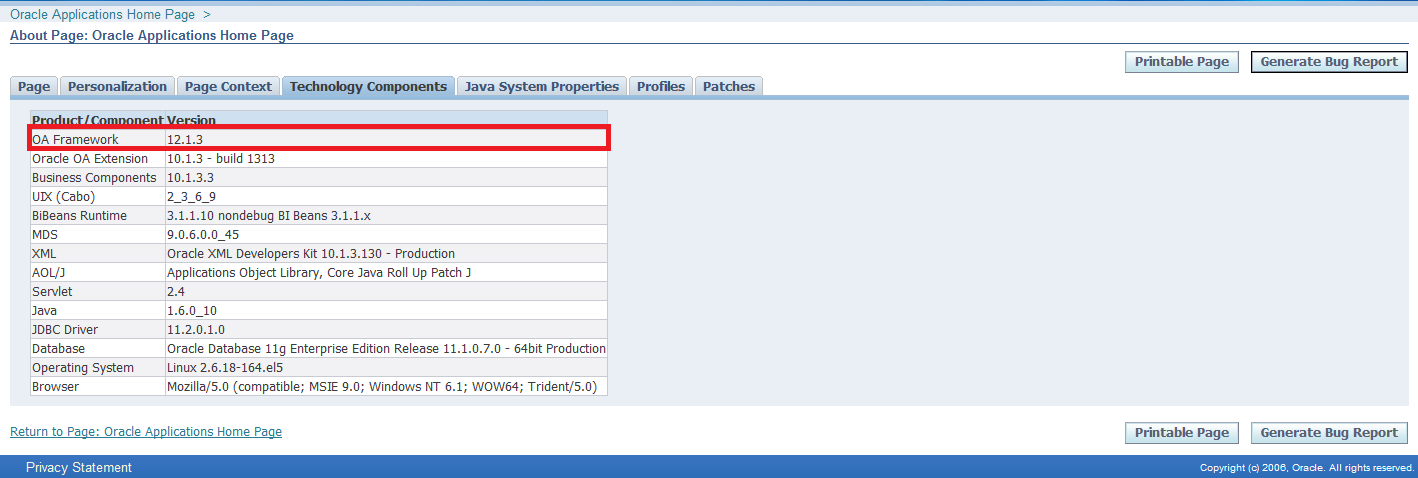
To get OAF version used by your instance, login at application and click "About this page" link on the left button of OA page and select "Technology Components" tab.

After knowing your OAF framework version , login at Oracle Support and open Note ID: ID 787209.1 - How to find the correct version of JDeveloper to use with eBusiness Suite 11i or Release 12.


Download correct Jdeveloper patch and extract anywhere at your machine.

Follow the following steps to configure Jdeveloper

1- Specify Path of jdeveloper
Right click on My Computer, select Properties, click System Properties, Select Advanced tab , Click Environment Variables as given below screen shot
Variable name : JDEV_USER_HOME

Variable value : <>


2- Download DBC file
Download dbc file for this path $FND_TOP/secure at application server to local machine folder <>\dbc_files\secure

3- Create Database Connection
Open jdeveloper.exe from jdevbin folder
Select Connection Navigator, right click on Database and select New Database Connection

 In step1write Connection Name and choose Oracle(JDBC) at Connection Type


In step2 fill user name and password and deselect Deploy Password


In step3 fill connection details


In step4 you can click test connection


4- Project Properties
After creating workspace and project, click right click on project and select Project Properties


Select Business Compoenent in left pane, select from drop list your connection


Select  Oracle Applications > Runtime Connection  
Fille the following
DBC File Name : path of dbc file that was downloaded at previous step
User Name : application user name
Password : application user name password

Application Short Name : Enter short name of the responsibility that when running page in Jdeveloper local will run under this responsibility
Responsibility Key : Key of responsibility.


Thanks

11 October, 2013

OAF : Disable Global Buttons in Page

I write snippet code to disable global buttons in OAF page.
You can add the following code to Controller class of the page that you want to disable global buttons inside it.

    public void processRequest(OAPageContext pageContext, OAWebBean webBean) {
        super.processRequest(pageContext, webBean);

        OAPageLayoutBean pageLayoutBean = 
            (OAPageLayoutBean)pageContext.getPageLayoutBean();
        pageLayoutBean.prepareForRendering(pageContext);

        OAGlobalButtonBarBean globalButtonsBean = 
            (OAGlobalButtonBarBean)pageLayoutBean.getGlobalButtons();
        globalButtonsBean.setRendered(false);
    }

Thanks

25 September, 2013

OAF Overview

This post will explains some terminologies that is used in Oracle Application Framework (OAF).

Entity Object - business component entity objects maps to database table or view that allow DML operations and that used to cache data result set and perform validation before post changes to database. 

Association Object - business component association objects implement the relationships between different entity objects and can mapped to database referential integrity constraint or non existing referential integrity constraint and this case constrain will be validated in OAF but not in database.

View Object - business component view objects are used to display data in UI pages and it can be based on
1- Entity Object or many entity objects and this case it supports DML operations.
2- SQL queries  : that's doesn't support DML operations
3- Static : Programmer create structure of view object attributes and can add static data also.
4- Programmatic : Programmer write code at runtime to get dynamic data of view object.

View Link - Establishes a master/detail relationship between different view objects and can be in more depth master/detail/detail/....

Validation View Object - A view object created exclusively for the purpose of performing light-weight SQL validation on behalf of entity objects or their experts.

Application Module - An application module is a container for related BC4J objects. The AM is connected to the database, and is responsible for the commit and rollback of a transaction.

Validation Application Module - An application module created exclusively for the purpose of grouping and providing transaction context to related validation view objects. Typically, a standalone entity object or the top-level entity object in a composition would have an associated validation application module.

Root Application Module - Each pageLayout region in an OA Framework application is associated with a "root" application module which groups related services and establishes the transaction context.

This transaction context can be shared by multiple pages if they all reference the same root application module, and instruct the framework to retain this application module (not return it to the pool) when navigating from page to page within the transaction task.

Entity Expert - A special singleton class registered with an entity object (EO) that performs operations on behalf of the EO.

Controller - The controller is the java code in charge of loading a page when we call it. It is also in charge of handling an event on a page, like a click on a button, or the call of a List Of Values.
 

Attribute Set - Bundles of region or item properties that can be reused either as is or with modifications. For example, all buttons sharing the same attribute set would have the same label and Alt text. 


Thanks

07 May, 2013

OAF : Bounce Appache Server

Connect to server using putty and execute the following commands

1- Enter commands folder
cd $ADMIN_SCRIPTS_HOME

2- execute the following commands to stop Apache
adapcctl.sh stop
adoacorectl.sh stop

3- Execute the following commands to start Apache
adapcctl.sh start
adoacorectl.sh start

Thanks

24 April, 2013

OAF : Get Current Row in Table

Sometimes you want to get current row in table. To apply this you can use the following code in controller and write it inside processFormRequest method.

     public void processFormRequest(OAPageContext pageContext, 
                                   OAWebBean webBean) {
        super.processFormRequest(pageContext, webBean);
        //Get application Module
        OAApplicationModule am = pageContext.getApplicationModule(webBean);
        
        //Get Row Refrence
        String rowReference = 
            pageContext.getParameter(EVENT_SOURCE_ROW_REFERENCE);
            
        //Get current Row using Row Reference    
        OARow currRow = (OARow)am.findRowByRef(rowReference);
        
        //Get attribute value from current row
        String attrValue = (String)currRow.getAttribute("AttrName");
    }


Thanks

01 April, 2013

Oracle OAF MDS Repository

MDS repository stores all pages and regions used in OAF pages and contain personalization and extensions.

All MDS data stores in the following 4 tables.
1. JDR_PATHS: Stores the path of the documents, OA Framework pages and their parent child relationship.
2. JDR_COMPONENTS: Stores components on documents and OA Framework pages.
3. JDR_ATTRIBUTES: Stores attributes of components on documents and OA Framework pages.
4. JDR_ATTRIBUTES_TRANS: Stores translated attribute values of document components or OA framework pages.

JDR_UTILS PL/SQL package supports the MDS repository and can be used to query and maintain the repository.

Thanks

20 March, 2013

Oracle OAF Profile Option

Oracle OAF has some important profile options which is useful in extension or personalization.
I will list it below and write breif about every profile option.

1- FND_Diagnostics
Setting this profile option to YES, will add anew link "Diagnostics" at top right on page, that allow developer to trace logs.

To add log when coding use the following code in Controller or Application Module
In Controller write this code:-
pageContext.writeDiagnostics(this, "Phrase will be added to logs", 1);

In Application Module write this code
getOADBTransaction().writeDiagnostics(this, "Phrase will be added to logs", 1);

2- Personalize Self-Service Defn
 Set this profile to Yes to allow personalization. 

3- FND: Personalization Region Link Enabled :
Set this profile to  Yes  show "Personalize  Region" links above each  region in a page.


4- Disable Self-Service Personalization
Yes will disable all personalization at any level.

5- FND: Personalization Document Root Path
Set this profile option to a directory at application server machine which will contain import/export personalization files.

Thanks

16 October, 2012

OAF : Upload Excel File to Database


I want to allow user to upload excel file in database from OAF page.

Suppose that excel file contains below columns
EmpNo
EmpName
Job

Suppose also that I have Entity Object named XxxEmpEO and I created View Object XxxEmpVO based on previous entity object which has below attributes
EmpNo
EmpName
Job

Scenario
I added new item in page of type messageFileUpload ["uploadExcelFile" ] and Button ["uploadButton"].
If user click a button, I will upload excel file that is entered in messageFileUpload item to Entity Object and then commit changes to database.

05 May, 2012

ADF & OAF : Add Attribute to View Object Progmatically

You can add transient attribute to view object progmatically at run time.
You can use this transient attribute to store any temporary data for every row in view object or create generic solution in your custom framework for general purpose.

ADF
in ِADF you can use below code anywhere in ApplicationModuleImpl class
I will check existence of attribute XXAttr, If it is not exist I will add it to view object
     ViewObject vo = this.findViewObject("ViewObjectName");  
     if (vo != null) {  
       try {  
         String transientAttr = vo.findAttributeDef("XXAttr").toString();  
       } catch (Exception e) {  
         vo.addDynamicAttribute("XXAttr");  
       }  
     }  

28 April, 2012

Get Sequence Next Value in OAF

I posted Get Sequence Next Value in ADF.
Today I will create function that returns sequence next value in OAF framework.

We pass sequence name to method and it returns next value of sequence

 public Number getSequenceValue(String sequenceName) {  
     Number sequenceValue;  
     if (sequenceName != null && !"".equanls(sequenceName)) {  
       OADBTransaction transaction = getOADBTransaction();  
       sequenceValue = transaction.getSequenceValue(sequenceName);  
     }  
     return sequenceValue;  
   }  

Thanks
Mahmoud A. El-Sayed

ADF : Scope Variables

Oracle ADF uses many variables and each variable has a scope. There are five scopes in ADF (Application, Request, Session, View and PageFl...