The main purpose of this post is how to install oracle standalone workflow repository
Prerequisites
- Download the Companion CD on OTN : Oracle Database 10g Release 2 (10.2.0.1.0) , File : 10201_companion_win32.zip
Steps to install oracle workflow
1- unzip file of companion CD
2-Run the setup.exe file
3-choose the second choice : Oracle Database 10 Products then click on the next button
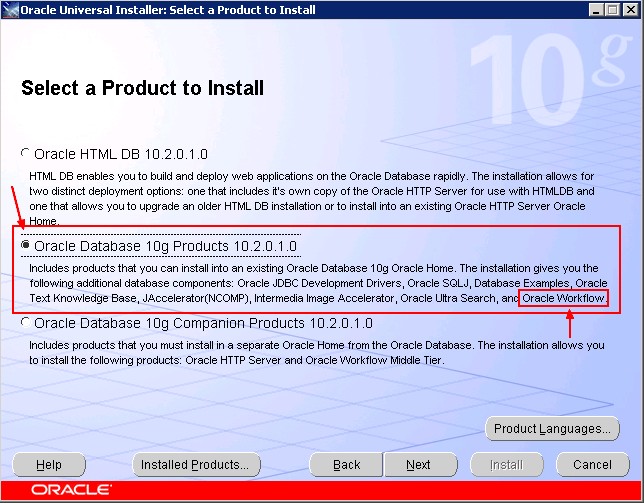
4-choose the same location and the same oracle home than the database.
Steps to install Oracle Workflow Manager
1-Start the Oracle Universal Installer (already installed). For instance, from the Menu : Start / All Programs Oracle - OraDb10g_Home1 / Oracle Installation Product / Universal Installer.
2-Click next
3-Locate the products.xml of the companion software. Example :<path of companion CD>\10201_companion_win32\stage\products.xml and click next
4-Choose Oracle Database 10 Companion Products (The third one)

5-Then select the two products

6-In the Home Details, specify a new Home in a new Location.
Name : OraDb10gCompanion_home1
Path : C:\oracle\product\10.2.0\OraDb10gCompanion_home1
7-Enter the Workflow Parameters
Workflow Schema : owf_mgr
DbHostName : 127.0.0.1
Port : 1521
SID : ORCL
8-Then fill the workflow user password
9-After the end of the installation, you are normally able to reach this url :
http://hostname:7777/pls/wf/wfa_html.home
10-open the previous link
11-Enter the oracle workflow user and password

Steps to install Oracle standalone Workflow Repository
1-Stop all running OC4J instances
2-From the windows menu : Start/Oracle - OraDb10g_Home1/Configuration and Migration Tools
/Worklow Configuration Assistant
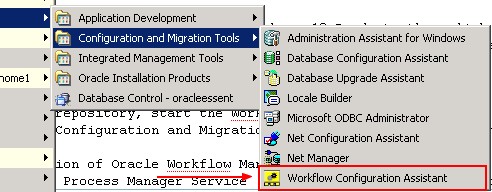
3-Enter the following parameter
Install Options: select Server Only
Workflow Account: workflow Schema Name (default owf_mgr)
Workflow password: workflow Schema password
SYS Password: SYS password
TNS Connect Descriptor: <hostname>:<port>:<SID>
4-The configuration process can take several minutes. When the process is
   complete, the Workflow Configuration Assistant displays a message of
   completion
Thanks
