03 March, 2012

Plsql Exception Management - Part 1


Achieving ideal error management
You should take care of the following points
1-Define your requirements clearly
2-Understand PL/SQL error management features and make full use of what PL/SQL has to offer
3-When will errors be raised, when handled?
     Do you let errors go unhandled to the host, trap locally, or trap at the top-most level?
4-How should errors be raised and handled?
    Will users do whatever they want or will there be standard approaches that everyone will follow?
5-Useful to conceptualize errors into three categories: Deliberate, unfortunate, unexpected

PL/SQL error management features
1- Defining exceptions
2- Raising exceptions
3- Handing exceptions

We will explain every topic individually

02 March, 2012

Set Initial Focus on item in OAF Pages

You can set initial focus in page on certain item.

Suppose that need to set focus on item ( XXX_EMP_NAME ), then you should add below code in processRequest() method in Controller class


 public void processRequest(OAPageContext oapagecontext, OAWebBean oawebbean)  
 {  
   super.processRequest(oapagecontext, oawebbean);  
   
   OABodyBean oabean = (OABodyBean)pageContext.getRootWebBean();  
   oabean.setInitialFocusId("XXX_EMP_NAME");  
 }   
 
Don't forget to add below import to Controller class
import oracle.apps.fnd.framework.webui.beans.OABodyBean;
 
Mahmoud Ahmed El-Sayed

01 March, 2012

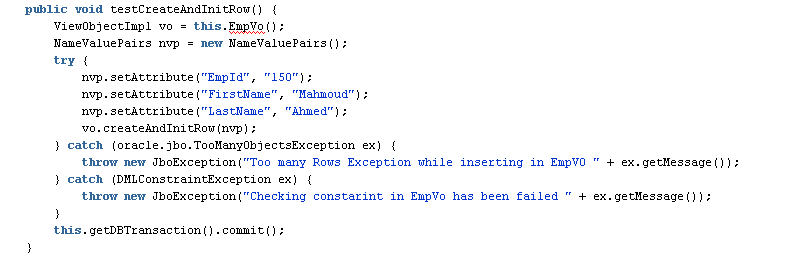
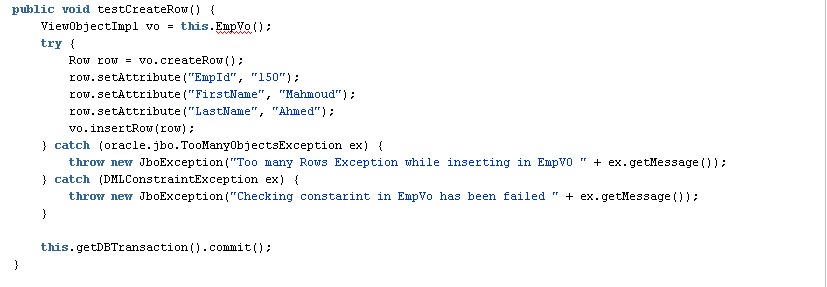
Insert Rows in ADF View Object Programatically

I will illustrate how to insert new rows in view object programatically.

ٍSuppose that I have EmpVO view object which have below attributes
a-EmpId
b-FirstName
c-LastName

We can do inserting rows by two ways in data model layer (Application Model or ViewObject classes)
I will write my code in ApplicationModuleImpl class


1-createRow() method

2-createAndInitRow() method

 
I prefer using second method  createAndInitRow because it sets default values of attributes in view object but first method insertRow doesn't do this.

Mahmoud Ahmed El-Sayed

26 February, 2012

Calling Stored Procedures or Functions from OAF Page

To invoke a stored procedure or function  from within an entity object or an application module, you need to follow below steps:
1. Create a CallableStatement with the PL/SQL block containing the stored procedure or function invocation
2. Bind any parameters ( IN or OUT )
3. Execute the statement.
4. Optionally retrieve the values of any OUT parameters or return value of function
5. Close the statement.

I will illustrate previous steps in below examples

1-Stored Procedure with OUT parameter

 public void testStoredProcedure() {  
   
     OADBTransaction txn = getDBTransaction();  
   
     CallableStatement callableStatement =  
   
       txn.createCallableStatement("begin xxx_procedure(:1, :2); end;",OADBTransaction.DEFAULT);  
   
     try {  
   
       callableStatement.registerOutParameter(2, Types.VARCHAR);  
   
       callableStatement.setString(1, "mahmoud");  
   
       String outParamValue = null;  
   
       callableStatement.execute();  
   
       outParamValue = callableStatement.getString(1);  
   
       callableStatement.close();  
   
     } catch (SQLException sqle) {  
   
       callableStatement.close();  
   
     }  
   }   

2- Stored Function

 public void testFunction() {  
     OADBTransaction txn = getDBTransaction();  
   
     CallableStatement callableStatement =  
   
       txn.createCallableStatement("begin :1 := xx_function(:2); end;",OADBTransaction.DEFAULT);  
   
     try {  
   
       callableStatement.registerOutParameter(1, Types.VARCHAR);  
   
       callableStatement.setString(1, "mahmoud");  
   
       String outParamValue = null;  
   
       callableStatement.execute();  
   
       outParamValue = callableStatement.getString(1);  
   
       callableStatement.close();  
   
     } catch (SQLException sqle) {  
   
       callableStatement.close();  
     }  
   }  
Mahmoud Ahmed El-Sayed
23 February, 2012

Joke with Oracle

We always use to_char(date,'day') to get day name of in_date in oracle PLSQL.

In my work I want to do below task.

If day of given day is friday then don't execute procedure otherwise execute.
So I wrote below code, You can check it and expect result

DECLARE
   LC$CURR_DAY    VARCHAR2 (10);
   LD$CURR_DATE   DATE := TO_DATE ('17-02-2012', 'dd-mm-yyyy'); --this is friday
BEGIN
   LC$CURR_DAY := TO_CHAR (LD$CURR_DATE, 'day');
   DBMS_OUTPUT.PUT_LINE (LC$CURR_DAY);

   IF LC$CURR_DAY= 'friday'
   THEN
      DBMS_OUTPUT.PUT_LINE ('It is weekend !!!, Go to Bed');
   ELSE
      DBMS_OUTPUT.PUT_LINE ('You should do your best at work');
   END IF;
END;

20 February, 2012

Delete Duplicate Rows in Oracle Database


I have a table CMS_TRANS contains a lot of duplicate row.
I should delete duplicated rows from this table.

The structure of table as below

create or replace table CMS_TRANS(
trans_id number ,
trans_code varchar2(10),
trans_date date,
trans_desc varchar2(500) );

This table doesn't has primary key so redundant data is allowed, so I want to delete duplicate data which are repeated in trans_code,trans_date columns

I saw a lot of  solution of other people to do this, but I was surprising as there is easy solution that I will write it and they use complex solution to do this.

My solution is

DELETE FROM CMS_TRANS
      WHERE ROWID IN
               (SELECT ROWID
                  FROM CMS_TRANS T1
                 WHERE EXISTS
                          (SELECT 1
                             FROM CMS_TRANS T2
                            WHERE     T1.TRANS_CODE = T2.TRANS_CODE
                                  AND T1.TRANS_DATE = T2.TRANS_DATE
                                  AND T1.ROWID > T2.ROWID))


Mahmoud Ahmed El-Sayed

18 February, 2012

ADF Integration With LDAP

I received last week in my work new requirement to make signing in application single sign on(sso) through active directory.
So I have a lot of solution
1- Use ADF Security and integrate with active directory LDAP from weblogic server
     This solution is declarative but customization is hard

2- Use custom java code to integrate with LDAP directly.
     This solution is good but what if I change UI development by another tool? I will redevelop again in new   framework
3- Create database package to integrate with LDAP
     I prefer this solution as I use DB to integrate with LDAP and it is unit of later maintenance and applicable for other application.


ADF : Scope Variables

Oracle ADF uses many variables and each variable has a scope. There are five scopes in ADF (Application, Request, Session, View and PageFl...